Anecdote
A career anecdote tracker that interviews you. Two questions in chat, a STAR-formatted story at the end.
Try it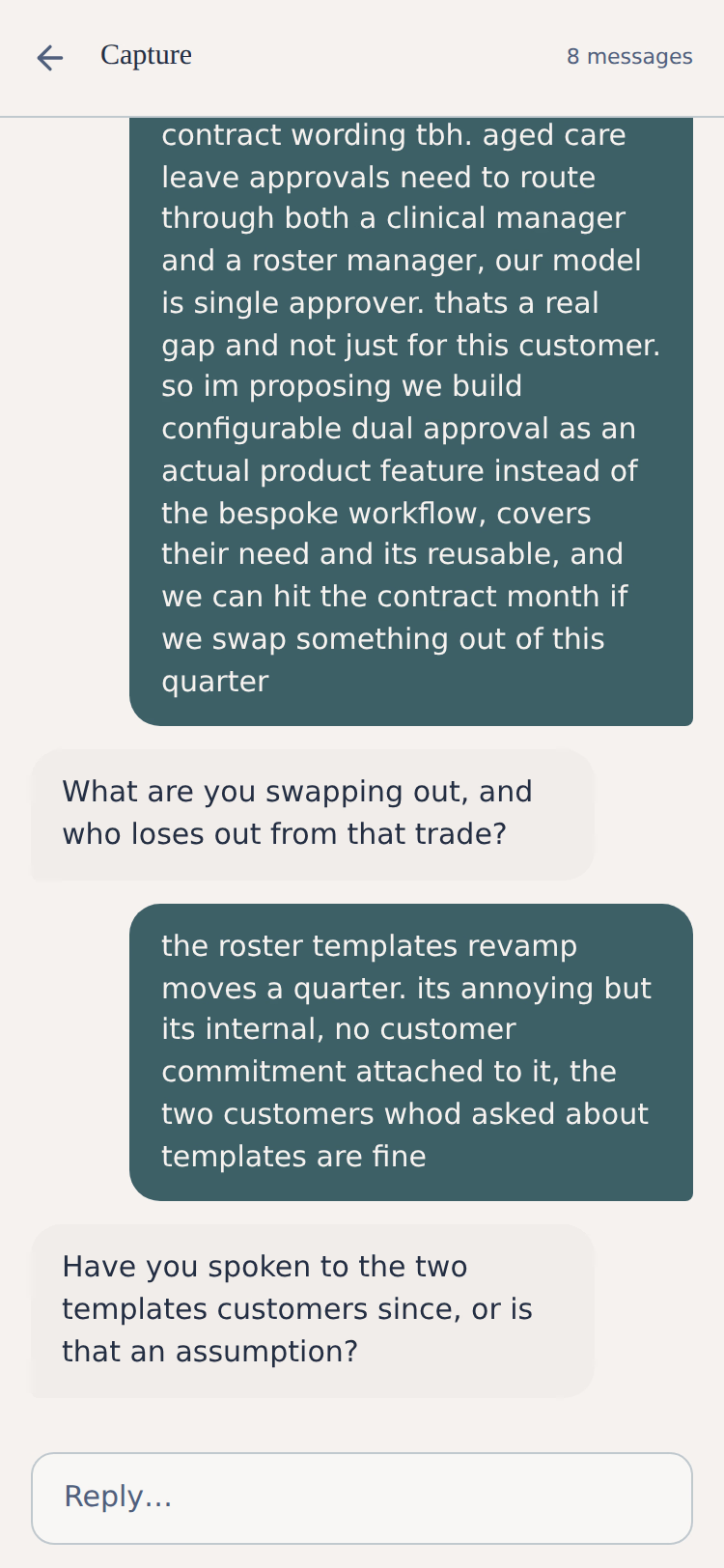
Problem
Every year, performance review comes around. I sit down to think about what I actually achieved, and the specifics have floated away. Every year, I tell myself I’ll start a list. The list lasts two weeks. The work is upfront and the reward is months later. If I’m not prompted, I don’t remember to log it.
The interview, not the form
Most career trackers are forms where you do all the work to structure your inputs. I wanted to minimise the cognitive load of capturing a story or success from work, because the easier capture is, the more capture I’ll actually do. From using LLMs across all sorts of work, I found that the interview is a super powerful technique for scoping projects and gathering missing information. Just ask the LLM to interview you. That’s the core of what I built this little app around: you start with as little as you want about a moment from work, and the app interviews you to fill in the rest. The interview, not the form.
What it does
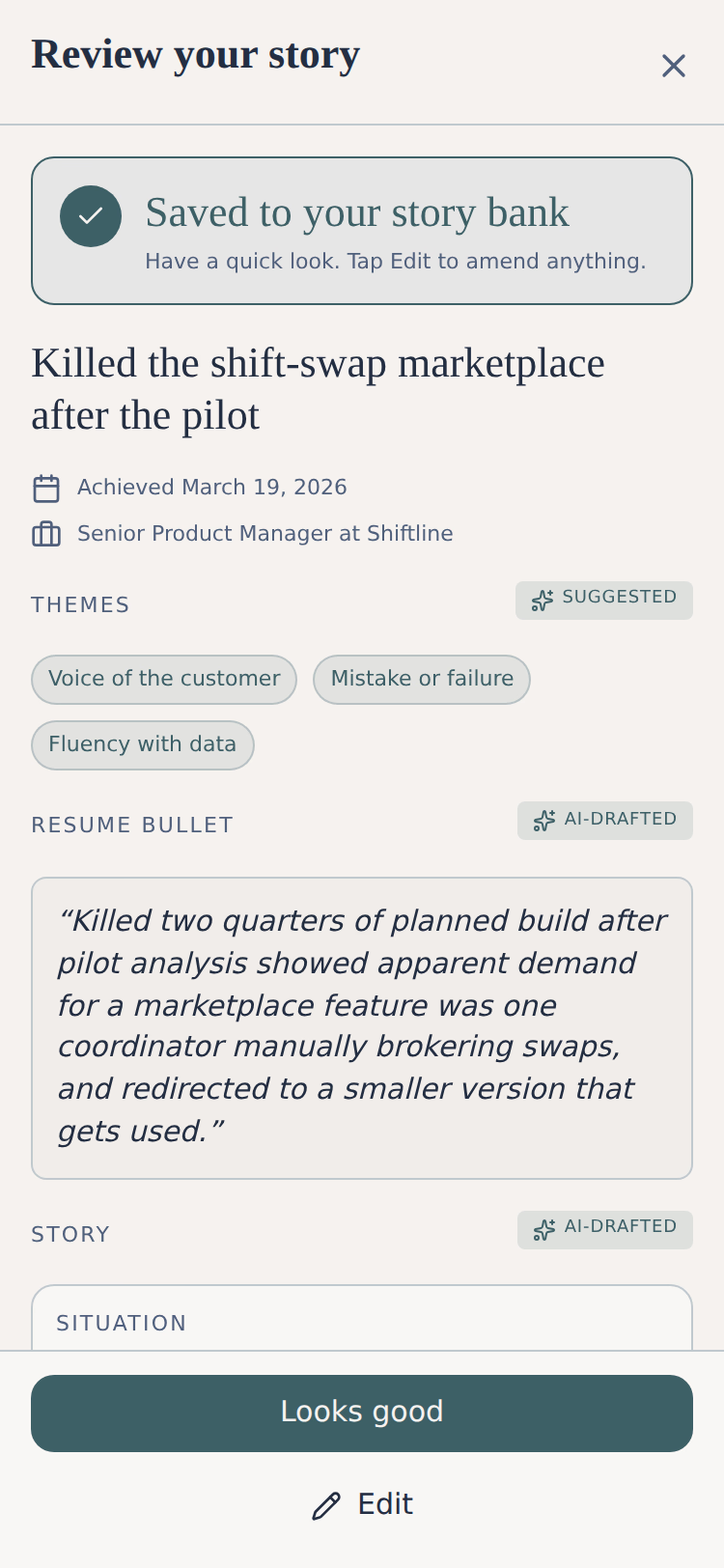
Anecdote helps people keep track of their achievements at work. Starting with a weekly nudge by SMS, to save one story for the week. The aim is to record details while context is freshest, so even if the results of a situation aren’t available yet (e.g. the feature is in development), it can still capture the partial story, and will remind you to finish it at the right time later. The interviewing flow takes a lot of the hard work out of capturing stories. An LLM is used for what it does best: restructuring text input.
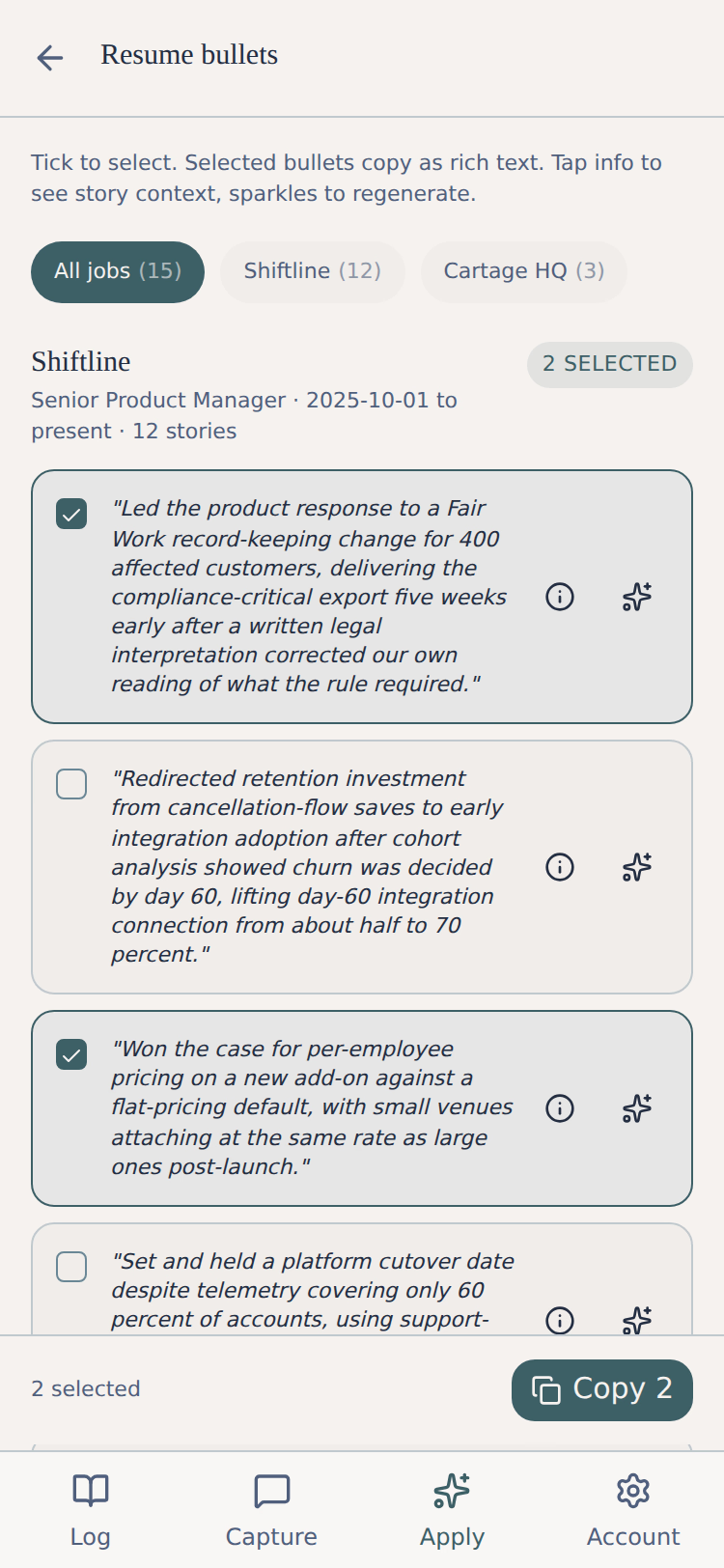
The other side of Anecdote is ‘Apply’: how the stories get used. Right now, this is a basic performance review and resume writing support flow to select stories to export, copying them with rich text formatting. Admittedly basic. I’ll make this better when I’ve tried it in this year’s performance review.
A few highlights of the backlog. In the short term I want to add voice mode for the interview step, to reduce friction even further. Typing a lot on a phone sucks. I’m considering trying OpenAI’s realtime voice API for a truly conversational flow; at minimum this will be a dictation mode to spare the pain of typing on a phone. If I ever try to commercialise this app, I’m also going to build an interview prep mode. Leaning on the stories people have captured, to interactively coach them through interviewing well.
Architecture
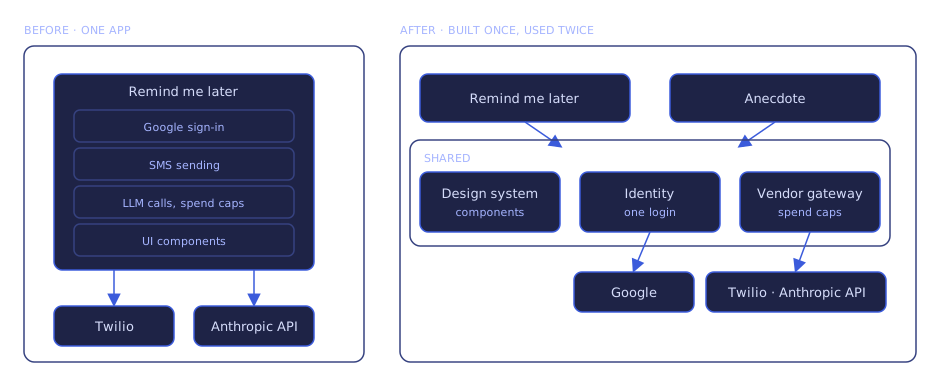
When starting on Anecdote, I realised Remind me later already had a lot of the foundational functionality I wanted: Google OAuth for identity, SMS via Twilio, LLM via Anthropic API, a gateway layer with spend controls like a per-user daily SMS cap, and a set of design system components.
This realisation spawned a technical foundations phase before I started work on Anecdote itself. Over 4 nights after work, I worked with Claude Code to extract those capabilities into separate services and libraries, so I could reuse them on Anecdote and on other projects later.
Next
With a bunch of services and environments now in play, I created a new problem for myself: keeping everything up to date.
What's new
27 Apr – 18 Aug 2026 · 24 entries-
Save real conversation data for offline model tests
A snapshot of real conversations was saved so language models can be compared against the same fixed inputs, instead of querying the live database each time.
-
Anecdote looks right on a desktop screen
Today was one small layout change for people on a computer rather than a phone.
- On a wide screen the app now renders in a centred column with a coloured margin on each side, so it reads as designed instead of stretching awkwardly across the window.
-
Going back from a finished story lands where you expect
A small day, one fix and some notes for later.
- Three improvements were noted for later: a text box that grows line by line, story history that reads as notes, and tidier pop-up messages.
- Fixed the back arrow on a finished story sometimes landing on an unhelpful error screen; it now always returns to the log.
-
Save a finished story as done, with no reminder attached
Stories that arrive finished no longer get stuck waiting for a check-in you didn’t ask for.
- A story you save with a result now lands as done with no next-check date, so you aren’t chased to revisit something already finished.
- You can now mark any waiting story as done in one tap, so a result that turns up later can close it off.
- Fixed the Log’s first tab, which was labelled “Active” but only ever showed finished stories; it now reads “Done”.
-
Reminders now link to the story they're about
Anecdote texts a reminder when a saved story still needs its result or its next action written down.
- You can now tap that reminder to open the exact story, instead of opening the app and searching for the right entry.
- Fixed the reminder still telling you to reply to archive a story, when replies to that number no longer reach anyone.
-
Behind-the-scenes timing across Anecdote
This was groundwork rather than a visible feature, covering the text-message conversations, scheduled jobs and account checks that make up Anecdote.
-
Anecdote now keeps a timed record of everything it does
The day went to wiring Anecdote into the monitoring rollout running across every project.
- Every request is now timed and tied to the signed-in person, so a slow or failing action can be traced to exactly what ran.
- The app now records sign-ins, sign-outs and saved stories as usage events.
- Every database query, the scheduled background jobs included, is now timed, and a read that hits a momentary failure retries once instead of failing.
-
Keep adding detail to a story after the bot offers to save
The capture conversation got smoother, on screen and in the reply box.
- You can now keep typing more detail after the assistant offers to save a story, so a half-finished thought isn’t lost.
- Fixed cramped answer boxes that hid long text behind a scroll, and a loading spinner that could stay spinning after your reply had already sent.
-
Weekly reminder texts arrive again
A few things that had quietly stopped working on your phone got put right.
- Your weekly text prompting you to capture a story now arrives every week, where before it silently stopped after the very first one.
- Fixed long stories getting cut off with no way to scroll to the end, and an unreachable Edit button on the story review screen.
-
New reusable interface pieces in the shared toolkit
These are building blocks for screens still being designed, so nothing in the app looks different for now.
-
Your half-finished story is waiting when you come back
Story capture moves fully into the web app, and text messages are now just reminders.
- You can now leave a half-written story and pick it up later, because a draft is no longer thrown away after a day.
- You now write your stories in the web app instead of by text, so capturing and continuing one happens in a single place.
- The weekly reminder is now a short text with a link that opens the capture page, so you can start a story in one tap.
-
Add an update to a saved story through a guided chat
Finishing off a saved-but-incomplete story got the same conversational treatment as writing one from scratch.
- You can now finish a pending story through a chat, so the app draws out the missing detail instead of leaving you a blank box.
- The chat asks only about the piece you left blank, so you’re not re-entering what you already wrote.
- If the outcome hasn’t happened yet, you can say so and the story saves as a checkpoint, instead of the bot asking again and again.
- Once you add the result, the story is marked complete, so it moves out of your pending list.
- Fixed the mobile keyboard pushing the page header off screen, and the message box flickering as it grew from one line to several.
-
Redesigned message box in the capture chat
Capturing a story means typing into a chat, and that message box got a redesign.
- The Send button now stays hidden until you start typing, so an empty message box looks less cluttered.
- The box stays compact for a short note and grows taller for a longer one, so you can see everything you write.
- Fixed the mobile keyboard hiding your newest messages and leaving a gap below the chat when it opened.
-
Choose when to be reminded about an unfinished story
Reminders got the attention, both in the app and by text message.
- Save a story before finishing it, and you can now set a reminder date so you pick when to be nudged back.
- You can now text yourself a test message from your account page, to confirm reminders will reach your phone.
-
Unfinished stories now remind you to come back
Anecdote lets you save a story before it’s finished, and now it won’t let one slip your mind.
- When you save an unfinished story, the app now sets a reminder for you, so a draft no longer sits in your pending list untouched.
- The reminder lands about a week later at 5pm in your own timezone, so it arrives in the evening rather than at some odd hour.
-
More automated tests behind Anecdote
Work went entirely into automated tests and developer tooling for Anecdote, with nothing that changes how the app works for you.
-
New automatic checks keep the app's tests in place
This was behind-the-scenes groundwork, adding tools that generate test stories and automatic checks that stop untested code going live.
-
Keep an unfinished story when you leave capture
Leaving the capture screen no longer means losing a story you had not finished telling.
- Navigating away from capture with an unfinished story now prompts you to save it as a draft, so nothing you started disappears.
- Saving the draft brings it back automatically the next time you open capture, so you can pick up where you left off.
- Choosing discard clears the draft, so an abandoned story does not reappear later.
- Closing the tab or refreshing keeps your story on its own, without asking you anything.
-
See your saved story on a review screen before moving on
Anecdote’s story-capture flow got worked over from end to end.
- After saving a story in chat, you now see the whole entry first, so you can confirm it or edit it before moving on.
- The bot now keeps asking until a story has real action, a measurable result and stakes, so what you save holds up in an interview.
- Saved stories, regenerated resume bullets and synthesised updates now read in your own first-person voice, not a coach describing you in the third person.
- A story can now carry more than one behavioural theme, so one about both leadership and a tough challenge keeps both tags.
- Your themes now split into behavioural categories and approach themes, with the five core categories protected so you can’t accidentally delete them.
- You can now press Enter for a new line while capturing, and send with Shift, Cmd or Ctrl plus Enter, so multi-line messages are easy.
- Your reply and a thinking spinner now show the instant you send one during capture, instead of after a pause, so the chat feels quick.
- While a story saves, the chat now shows a “Saving your story” indicator, so you know it’s working rather than wondering if the tap registered.
- When you add an update to a pending story, the result field now shows animated dots while it’s rewritten, so the wait is visible.
- Fixed the Start interview button dropping off-screen on mobile, the Active tab listing unfinished stories, and visual polish across the log, story and capture screens.
-
Saving a story no longer fails without warning
Saving a story became reliable, and a round of screen corrections landed with it.
- Finishing onboarding and saving your first story now works, where before it could silently fail and leave you unable to save at all.
- A save that does fail now shows a retry option, where before the spinner vanished and the screen looked like nothing had happened.
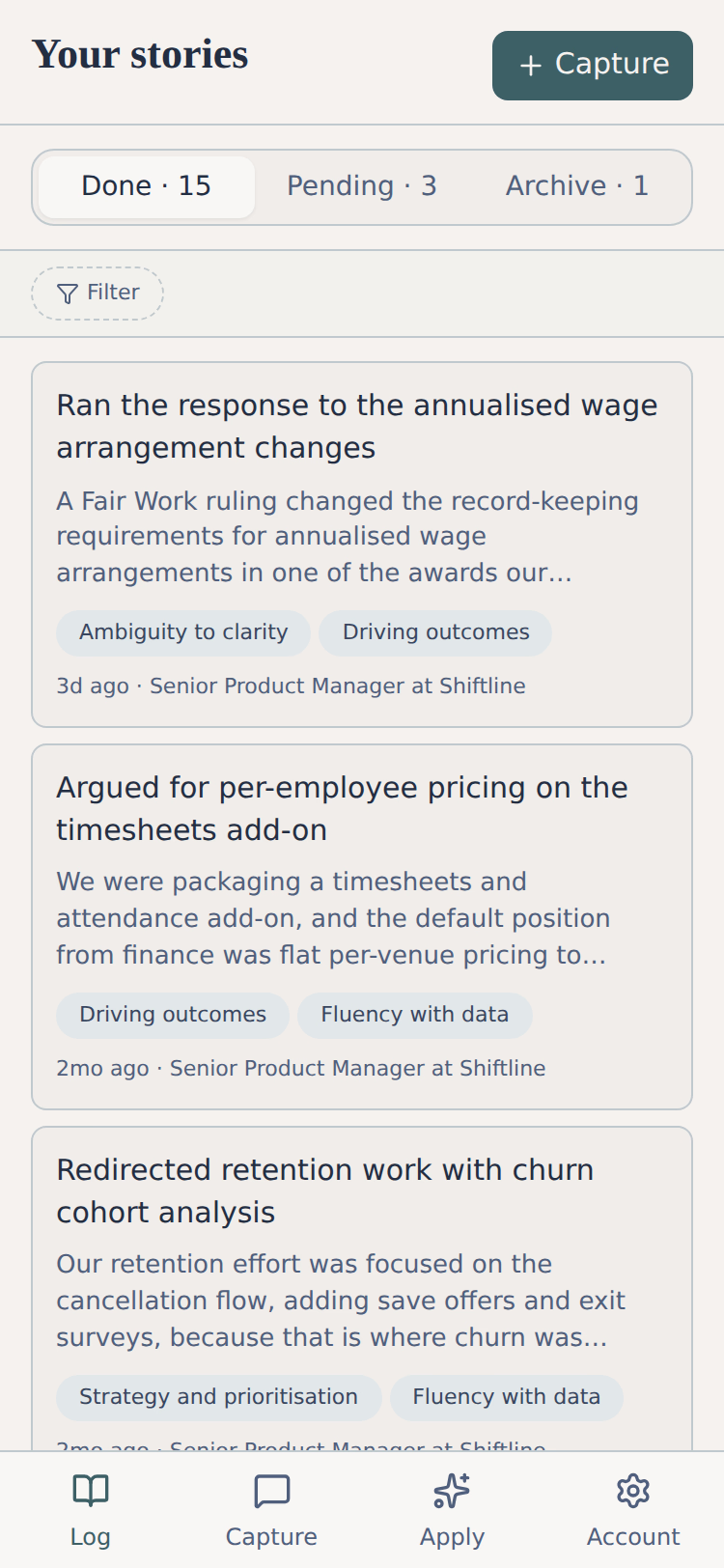
- The filter bar now always shows on your story log, so you can discover filtering without hunting for an icon in the header.
- While building a story by chat, the header now shows when the assistant is preparing its next question, so a pause reads as progress.
- Fixed page titles wrapping on phones, cut-off job titles, raw dates and phone numbers, unclear pick-one buttons, and a redundant tag on finished stories.
-
Anecdote is live for capturing your work stories
Anecdote is a new app that helps you keep track of what you get done at work.
- Describe something you did in a chat and the app draws out the details with follow-up questions, then saves it as a structured story.
- A weekly text asks what you worked on, and you can reply from the thread, so a win gets recorded while it’s fresh.
- You can browse your saved stories and filter them by theme, job or date to find the right ones fast.
- Stories still missing detail sit in a pending list and get occasional text reminders, so half-finished wins don’t get lost.
- You can turn your stories into resume bullets grouped by job, pick the ones you want, and copy them straight into a document.
- You can select finished stories and copy them as formatted text, ready to paste into performance review notes.
- You can set the themes you want to be known for, so your stories line up with what a review or interview asks about.
-
Designing Anecdote's next version
Anecdote helps people capture work achievements, and its next version got a full design pass.
- The capture flow, every screen and the wording of each reminder message were laid out, ready to build against.
- A publishing pipeline was set up to put the design diagrams and screen mockups on a public web page for review.
-
Planned a shared sign-in that works across different web addresses
The design lets a future app add sign-in by reusing the shared login, instead of building its own from scratch.
-
Planning an app that captures work wins by text message
Anecdote is a planned app for turning texted work wins into polished stories for reviews and interviews, and its foundations are now in place.
- The full build plan was written, from how a win is captured by text through to how it becomes a review-ready story.
- The colours and fonts were chosen and locked, and you can view the options weighed along the way as live mockups.